Imago Printer Imago Printer

How to Calibrate Colors for Your Digital Screen Printer?

Time:2026-06-22 Author:Sienna
0%

Calibrating colors on digital screen printers is essential for achieving high-quality prints. Accurate color reproduction directly affects customer satisfaction. A report from the Print Industry Association indicates that 85% of print buyers prioritize color accuracy. This highlights the importance of precise calibration methods.

To effectively learn how to calibrate colors on a digital screen printer, understanding the technology is crucial. Many printers utilize ICC profiles, which help in color management. However, relying solely on default settings can lead to inconsistencies, causing frustration for both printers and clients. Research shows that 30% of print operators report difficulties with color matching, emphasizing the need for more refined techniques.

Moreover, every printer and substrate behaves differently. This variability can lead to unexpected outcomes. Users must continuously test and adjust their settings. A lack of attention to detail might result in unacceptable print quality. Regular maintenance and calibration not only ensure vibrant colors but also extend the life of equipment. Embracing this ongoing process will lead printers to better serve their clients with accurate and reliable color outputs.
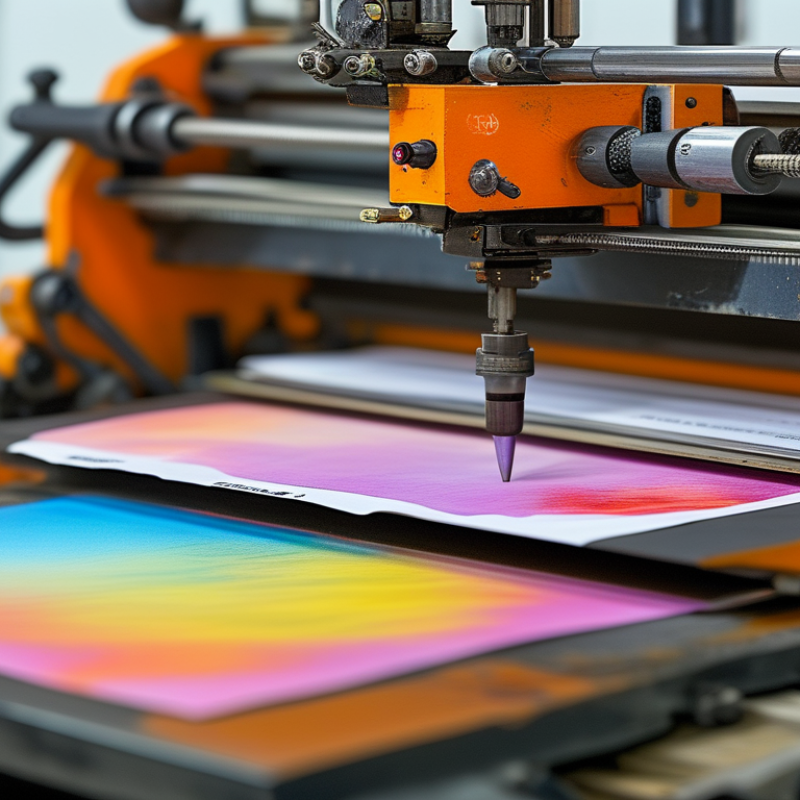
How to Calibrate Colors for Your Digital Screen Printer?

Understanding Color Calibration and Its Importance for Digital Screen Printing

Color calibration is crucial for digital screen printing. It ensures that the colors you see on your screen match the final print. Accurate colors lead to better client satisfaction and reduce reprints. Understanding color calibration helps you navigate the complexities of digital printing technology.

Tips for effective calibration: Use a color calibration tool to adjust your monitor. This guarantees the colors displayed are true to life. Regularly calibrate your screens, not just once. Environmental factors, like lighting, can alter perceived colors. Keep track of settings and revisit them. Adjust brightness and contrast to balance colors accurately.

Remember, not all monitors are created equal. Some may have inherent color biases. You may find discrepancies even after calibration. It's essential to test prints and make fine adjustments as needed. A willingness to adapt can significantly improve your color accuracy. Keep experimenting until you find the ideal settings. Aim for consistency in your prints, but be open to revisions along the way.

Essential Tools and Software for Effective Color Calibration

Calibrating colors for a digital screen printer is crucial for accurate prints. The right tools and software make this process effective. Start with a color calibration device. These tools help in measuring color accuracy, which is essential for any printer. Look for devices that suit your printing goals.

Software is equally important. It allows you to adjust and refine colors based on your measurements. Use calibration software that offers user-friendly interfaces. Many options provide step-by-step guidance for beginners. With experience, you will find your preferences and improve your workflow.

Tips: Regularly check your screen's brightness and contrast. This can influence how colors appear. Familiarize yourself with color profiles. These profiles assist in achieving consistent results across different devices. Remember that different lighting can affect color perception too. Spend time experimenting with different settings to understand how they impact your final print. Adjust as necessary to get the best results.

Step-by-Step Guide to Calibrating Your Digital Screen Printer

Calibrating colors for your digital screen printer can significantly enhance your print quality. Accurate colors ensure consistency in prints. According to a report from the Digital Printing Association, up to 30% of print jobs fail due to color mismatches. This highlights the importance of proper calibration.

Begin by using a color calibration tool. These tools measure color output and provide data for adjustments. Regular calibration recommends at least every month. This practice can improve color accuracy by around 20%, showing a notable difference. Many professionals report that after calibration, they experience fewer reprints and better customer satisfaction.

Check your printer’s profiles regularly. As printing materials change, profiles might not remain accurate. A recent study found that 50% of print businesses do not adjust their profiles often enough. This oversight can lead to errors and wasted resources. Consistent monitoring and adjustments are essential for maintaining high-quality output.

Color Calibration Results for Digital Screen Printer

Common Color Calibration Issues and How to Resolve Them

Color calibration is crucial for digital screen printers. Issues can arise from various sources, leading to inaccuracies in color reproduction. One common problem is inconsistent lighting. Proper lighting is essential for accurate color perception. Without it, colors may appear different on screen compared to printed output.

Another frequent issue is outdated calibration tools. Relying on old hardware or software can lead to significant discrepancies. Regularly updating and maintaining your calibration tools ensures the best color accuracy. Checking for software updates can make a meaningful difference.

Color profiles can also be a source of confusion. Printer and screen profiles must match to achieve the desired results. Sometimes, users may overlook this step, leading to unsatisfactory prints. A thorough review of your profiles can help fix many color-related problems. Small adjustments can lead to big improvements in color accuracy.

Maintaining Consistent Color Output: Tips and Best Practices

Calibrating colors for digital screen printing is essential for achieving consistent results. Variations in color can arise due to different factors. Lighting conditions, ink types, and paper affect color output. Monitoring these elements helps maintain quality.

Regularly checking your color calibration settings is vital. Colors can shift over time, leading to discrepancies in results. Use a color calibration tool to ensure accuracy. Make adjustments based on the specific materials you use. Small tweaks can make a big difference in the final product.

Consider the environment in which you work. Dust and humidity can impact color perception. Printing in a controlled space can lead to better outcomes. Pay attention to how colors appear on the screen versus how they print. Sometimes, the colors will not match perfectly, leading to frustration. Reflect on your process and adjust as needed to improve consistency.

FAQS

: What is the goal of calibrating a digital screen printer?

: The goal is to enhance print quality and ensure accurate color consistency.

How often should you calibrate your printer?

It's recommended to calibrate at least once a month to maintain accuracy.

What can happen if profiles are not regularly checked?

Errors may arise, leading to wasted resources and inconsistent print quality.

What factors can affect color output in printing?

Lighting, ink types, and paper can all cause variations in color.

Why is it important to monitor your calibration settings?

Colors can shift over time, potentially causing discrepancies in results.

How can environmental conditions impact printing?

Dust and humidity can alter color perception and affect print outcomes.

What tool can be used for color calibration?

A color calibration tool can measure output and help with necessary adjustments.

What should you do if colors don't match between the screen and print?

Reflect on the process and make adjustments as needed to improve results.

How does regular calibration impact customer satisfaction?

Regular calibration often leads to fewer reprints and improved customer satisfaction.

What small changes can help improve print output?

Small tweaks to calibration settings based on material can make a big difference.

Conclusion

Calibrating colors on a digital screen printer is essential for achieving accurate and consistent results in print production. The process begins with understanding color calibration and its significance in ensuring that the colors printed closely match those intended in digital designs. Employing the right tools and software is crucial for effective calibration, as they facilitate precise adjustments to various settings.

The step-by-step guide outlines how to calibrate colors on a digital screen printer, addressing common issues that may arise during the process and providing solutions to resolve them. Additionally, maintaining consistent color output requires implementing best practices and tips that help ensure the printer operates optimally over time. By mastering these techniques, users can vastly improve their print quality and reliability.

Sienna

Sienna

Sienna is a skilled marketing professional with a deep expertise in our company’s core products and services. With a passion for innovation and detail, she plays a pivotal role in crafting insightful blog posts that not only highlight the unique features of our offerings but also provide valuable......