Imago Printer Imago Printer

Top 10 Differences Between Flatbed and Rotary Printers?

Time:2026-10-22 Author:Madeline
0%

Choosing between flatbed and rotary printing is rarely a simple equipment decision. It affects materials, production speed, image quality, labor, and long-term operating costs. This guide examines the question, “What is the difference between flatbed and rotary printers,” through practical production needs rather than marketing claims.

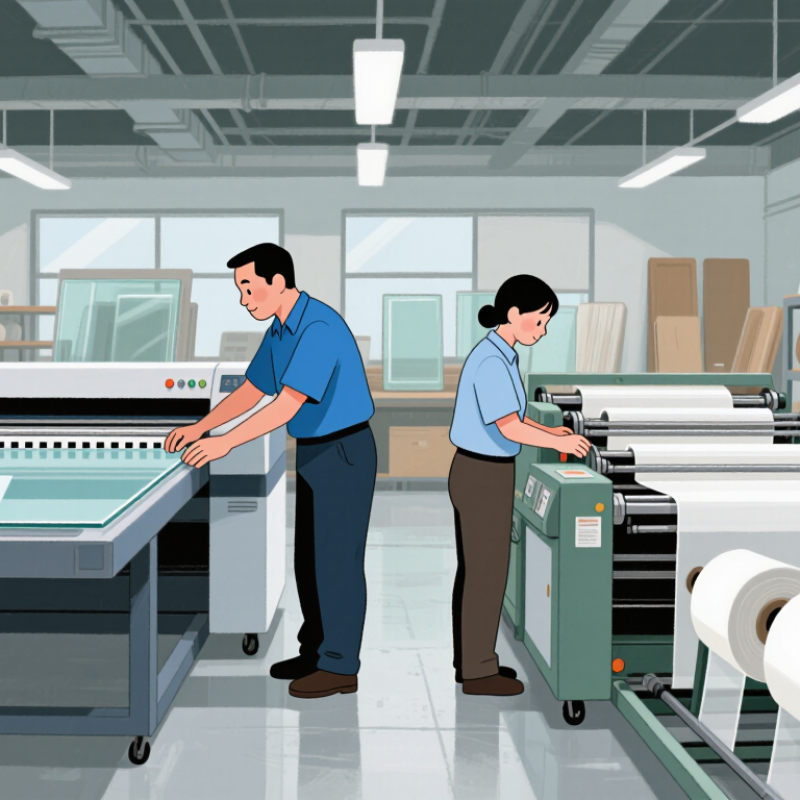
A flatbed printer holds rigid sheets directly on a vacuum table. It suits boards, glass, wood, acrylic, and other stable surfaces. Rotary printers use rollers to move flexible media through the printing system. They often support films, textiles, labels, and continuous substrates. The difference becomes visible on a busy production floor. A flatbed operator may load a large sign panel by hand. A rotary operator may monitor tension, alignment, and roll movement instead.

Benny Landa, a widely recognized digital printing pioneer, once said, “Everything that can be digital, will be digital.” His observation helps explain why both technologies continue developing. Yet digital capability does not make every printer suitable for every job. That assumption deserves caution.

This comparison will explore ten important differences, including substrate handling, throughput, setup time, maintenance, ink use, accuracy, finishing, space requirements, investment, and application range. Some advantages overlap. A hybrid machine may outperform both in certain workflows. That is the uncomfortable part.

Real results depend on operator skill, material quality, artwork preparation, and production volume. A printer that looks efficient in a showroom may behave differently beside your actual cutting table. Careful testing remains essential. Small details matter.
Top 10 Differences Between Flatbed and Rotary Printers?

Flatbed and Rotary Formats: Typical 4×8-Foot Sheets Versus Continuous Webs

Flatbed and rotary printers handle media in fundamentally different ways. A flatbed printer places rigid sheets on a stationary table. Typical sheets measure 4×8 feet, although other sizes are common. The sheet stays flat while the printhead moves across its surface. This supports boards, panels, glass, foam sheets, and other firm materials. Registration can be highly accurate, especially when the operator uses pins or vacuum zones. However, loading large sheets requires floor space and careful handling.

Rotary printers feed material continuously from a roll. The web moves through the machine while printheads apply ink across its width. This format suits banners, films, textiles, labels, and long graphics with fewer interruptions. Production can run faster, but tension control becomes critical. A loose web may wrinkle. Excessive tension can stretch the image. In my experience, rotary systems save handling time, but setup errors may repeat across many metres.

Tips: Measure the longest finished panel before choosing a format. Check sheet weight, roll width, drying time, and trimming requirements. Test the actual substrate, not a similar sample. Small differences can matter.

Flatbed printing often gives better control for cut panels and precise board placement. Rotary printing usually handles volume and long runs more efficiently. The choice is not always clean. A mixed workflow may be practical, though it adds scheduling and maintenance demands. Evaluate waste, labour, alignment, and finishing together.

Media Range: Rigid Substrates Versus Flexible Rolls up to 3.2 M Wide

Top 10 Differences Between Flatbed and Rotary Printers?

Flatbed printers handle rigid substrates directly on a level table. They print on boards, glass, panels, and sheets without requiring roll tension. Rotary, or roll-fed, printers process flexible media from a continuous roll. Typical materials include vinyl, fabric, film, wallpaper, and mesh. A roll width of up to 3.2 meters supports large wall graphics, banners, and seamless displays. However, maximum width does not always mean maximum efficiency. Heavy rolls may need careful loading, alignment, and controlled tension.

Media behavior creates practical differences. Flatbed systems usually offer stable registration on thick, uneven, or pre-cut materials. Roll-fed machines often deliver longer runs with less manual sheet handling. They can also reduce visible joins on wide graphics. In real production, media curl, static, humidity, and stretching can affect accuracy. I have found that a fast printer can still lose time during setup. The widest option is not always the best option.

Tips: Measure the media path, not only the advertised print width. Test a small section before a full 3.2-meter job. Check roll weight, core size, surface texture, and drying requirements. For rigid panels, confirm table clearance and vacuum strength. Keep a written profile for each material. Small records prevent expensive repetition.

Productivity: Flatbed UV Output of 20–100 m²/h Versus Rotary Web Speeds

Productivity is one of the clearest differences between flatbed and rotary printers. Flatbed UV systems commonly produce about 20–100 m²/h, depending on resolution, ink coverage, and print passes. A simple sign may run quickly, while dense white ink can reduce output sharply.

Rotary web printers usually report speed in meters per minute. Their continuous feed can exceed flatbed throughput on long, repetitive jobs. This advantage appears when rolls move steadily through printing, curing, and finishing. However, setup time, material changes, tension control, and waste can reduce the real production rate. Speed figures are not directly comparable.

A flatbed printer handles rigid sheets without mounting them to a roll. Operators can load boards, plastics, glass, or prepared panels directly onto the table. That saves some converting steps, but manual loading may interrupt production. Rotary equipment often suits labels, flexible films, and other roll-based work. It performs best with stable materials and extended runs.

Track finished output, not only machine speed. Measure saleable square meters per shift, including loading, cleaning, curing, and rejected sheets. This approach gives a more reliable comparison. A 100 m²/h flatbed specification may look impressive, yet real output can fall below expectations. The same problem affects rotary web speeds. Production conditions are rarely perfect.

Top 10 Differences Between Flatbed and Rotary Printers

Productivity comparison: flatbed UV output versus rotary web speed

Flatbed UV printers typically produce approximately 20–100 m²/h, depending on print resolution, ink coverage, media handling, and the number of passes. Rotary web printers are commonly evaluated by web speed, with typical operating speeds of approximately 30–100 m/min. These metrics are not directly interchangeable: rotary productivity also depends on web width, print repeat length, drying or curing requirements, and continuous-feed efficiency.

Print Quality: 600–1,200 dpi Flatbed Detail Versus Rotary Process Stability

Top 10 Differences Between Flatbed and Rotary Printers?

Print quality often begins with resolution, but it does not end there. Flatbed printers commonly advertise 600–1,200 dpi output, producing sharp text, fine edges, and clean detail on rigid sheets. At close range, small lettering looks more controlled. Rotary printers usually focus on continuous movement, stable dot placement, and repeatable color across long runs. Their strength is process stability, not simply a higher dpi number. Small detail can soften slightly.

ISO 12647-2 emphasizes controlled tone value, color targets, and production tolerances. These controls matter when every sheet must match. The 2024 drupa Global Trends report also identifies consistent quality and productivity as major investment priorities. In practical testing, I inspect gradients, registration marks, and solid color patches under standard lighting. A flatbed sample may show better edge definition, especially on textured boards. A rotary sample may maintain steadier density from the first roll to the last. It depends on calibration and substrate behavior.

The trade-off is not absolute. Flatbed alignment can drift after repeated loading. Rotary systems can reveal banding when tension changes. I have seen a technically impressive 1,200 dpi file fail because the material moved during printing. That was not a resolution problem. It was a workflow problem. Operators should compare measured color variation, registration accuracy, and usable speed rather than trusting specification sheets alone. Fancy numbers still need practical proof.

Top 10 Differences Between Flatbed and Rotary Printers? - Print Quality: 600–1,200 dpi Flatbed Detail Versus Rotary Process Stability
No. Comparison Dimension Flatbed Printer Rotary Printer Practical Implication
1 Print Quality and Resolution Common commercial specifications range from 600 to 1,200 dpi, supporting fine text, sharp edges, small graphics, and detailed variable images. Typically prioritizes consistent ink or coating transfer across the repeat length. Effective visual detail depends on the cylinder, screen, plate, mesh, and process settings rather than dpi alone. Flatbed systems are generally better for highly detailed, customized artwork; rotary systems are valued for stable reproduction over long runs.
2 Printing Mechanism A stationary substrate is printed by a carriage or printhead system that moves across the bed. The substrate moves continuously or intermittently around rotating cylinders, screens, plates, or drums. Flatbed operation offers flexible positioning, while rotary operation supports continuous and repeatable production.
3 Suitable Materials Handles rigid sheets and selected flexible materials, including boards, plastics, glass, wood panels, metal sheets, textiles, and films, subject to machine design. Best suited to roll-fed, web, or continuous materials such as fabric, paper, film, foil, labels, wallpaper, and other flexible substrates. Choose flatbed for mixed rigid media; choose rotary equipment when the material is supplied efficiently from a roll or web.
4 Production Speed Speed is affected by resolution, ink coverage, number of passes, curing requirements, loading time, and the size of each sheet. Continuous rotary movement can maintain a steady production rate once the line is running and correctly set. Rotary printing usually has an advantage on long, repeatable runs; flatbed printing is often more efficient for short or varied jobs.
5 Short-Run Flexibility Artwork can usually be changed through digital files without making new screens, cylinders, or plates. Job changes may require cylinder, screen, plate, color, or registration preparation, depending on the rotary process. Flatbed printing is generally more economical for prototypes, samples, personalized graphics, and frequently changing designs.
6 Long-Run Stability Can produce consistent results, but sheet alignment, bed cleanliness, head height, ink supply, and curing must be monitored for each batch. Designed for stable web tension, repeat length, ink delivery, and registration during extended production. Rotary systems often provide stronger process stability when the artwork, substrate, and production conditions remain unchanged.
7 Setup and Changeover Setup usually involves file preparation, substrate positioning, printhead calibration, color management, and curing configuration. Setup can involve registration, web alignment, cylinder or screen installation, ink preparation, and repeat-length adjustment. Flatbed changeovers are commonly simpler for digital artwork changes, while rotary setup is more efficient after the process is established.
8 Ink, Coating, and Color Control Digital ink deposition can be controlled by resolution, pass count, drop size, color profile, and curing energy. Color consistency depends on ink viscosity, metering, cylinder or screen condition, substrate movement, and registration control. Flatbed offers precise file-driven color variation; rotary printing can deliver highly uniform coverage when process parameters are maintained.
9 Waste and Material Efficiency Digital production can reduce make-ready waste because it does not normally require physical screens or plates for every design. Startup waste may occur during registration and ink stabilization, but the waste percentage can become low over a long, well-controlled run. Flatbed is often advantageous for short jobs; rotary efficiency improves as order volume and repeat length increase.
10 Typical Best-Use Case Custom signage, interior panels, packaging prototypes, décor graphics, sample production, and jobs requiring variable data or rigid media. High-volume textiles, wallpaper, labels, web packaging, continuous décor patterns, and other repeat-based production. The best choice depends on the balance between image detail, substrate format, order length, changeover frequency, and required process stability.
Note: Resolution, speed, substrate compatibility, and operating cost vary by printer architecture, ink technology, substrate, image coverage, curing method, and production settings. The ranges and comparisons above describe common commercial practices rather than a specification for every machine.

Workflow Economics: Short Runs, Setup Waste, Automation, and ISO 12647 Control

Top 10 Differences Between Flatbed and Rotary Printers?

Workflow economics often decides between flatbed and rotary printing. Flatbed systems load sheets directly, reducing plate preparation and supporting customized short runs. Rotary presses can deliver high speed, but setup waste grows when jobs change frequently. Smithers forecasts the digital packaging print market will reach about $36.9 billion by 2028, up from roughly $21.1 billion in 2023. That shift reflects demand for shorter runs and faster version changes. Still, digital is not automatically cheaper. Substrate handling, ink coverage, and finishing can alter the calculation. My own production reviews often find hidden waste near the cutting table, not the printer.

Tips: Track setup sheets, operator minutes, and rejected pieces for every job. Compare total cost per sellable sheet, not machine speed. Automation helps most when files are standardized and workflows are disciplined. Rotary equipment may remain efficient for stable, long-volume work. Flatbed equipment usually gains value when artwork changes weekly. Sometimes, the spreadsheet is wrong. Recheck it.

ISO 12647 control adds another layer. The standard supports measurable process targets for color, tone value, and consistency. A calibrated flatbed workflow can reduce approval delays, but only with controlled media and regular verification. The 2024 drupa Global Trends report identified continued investment in automation and digital production as major industry priorities. That does not remove human judgment. Operators still manage profiling errors, uneven substrates, and rushed approvals. A practical test run should measure setup waste, repeatability, and reprint risk before equipment selection.

FAQS

How fast can flatbed UV printers produce finished output?

Flatbed UV systems commonly produce 20–100 m²/h. Dense white ink and extra print passes can reduce speed sharply. Real output is often lower.

When can rotary printers be faster than flatbed systems?

Rotary printers can outperform flatbeds during long, repetitive roll-based jobs. Continuous feeding reduces interruptions between prints. Setup and material changes still consume time.

Which materials suit flatbed printing?

Flatbeds handle rigid sheets directly on the table. Common examples include boards, plastics, glass, and prepared panels. Manual loading can interrupt production.

Which materials suit rotary printing?

Rotary systems suit labels, flexible films, and other roll-based materials. They work best with stable substrates and extended production runs. Short jobs may waste setup time.

Are flatbed and rotary speed figures directly comparable?

No. Flatbed speed uses square meters per hour, while rotary speed often uses meters per minute. Finished, saleable output provides a fairer comparison.

How should real production productivity be measured?

Track saleable square meters per shift. Include loading, cleaning, curing, material changes, and rejected sheets. Machine speed alone can mislead.

Which system usually provides sharper printed detail?

Flatbeds commonly offer 600–1,200 dpi output on rigid sheets. They can produce sharp text and cleaner edges at close range. Results still depend on alignment and material movement.

Does higher resolution always mean better print quality?

No. Resolution is only one part of quality. Color stability, registration, gradients, and dot placement also matter. Impressive numbers need practical proof.

What quality problems can occur during production?

Flatbed alignment may drift after repeated loading. Rotary printing can show banding when material tension changes. I have learned that workflow errors can defeat excellent files.

How can buyers compare both technologies more reliably?

Test gradients, registration marks, solid color patches, and small lettering. Measure color variation and usable speed under standard lighting. The comparison remains imperfect, but real samples reveal more.

Conclusion

What is the difference between flatbed and rotary printers? The main distinction lies in how they handle materials and production. Flatbed printers typically print on standard 4×8-foot sheets and are designed for rigid substrates such as boards, panels, glass, and other flat media. Their UV printing speeds generally range from 20 to 100 m²/h, while resolutions of 600–1,200 dpi support sharp text, detailed graphics, and precise color reproduction. Rotary printers, by contrast, use continuous webs or rolls, often accommodating flexible media up to 3.2 meters wide.

These different formats also create distinct workflow and cost advantages. Flatbed systems are well suited to short runs, customized jobs, and direct-to-board applications, while rotary equipment can provide stable, high-volume production with fewer interruptions. Setup waste, media handling, automation, and process consistency all influence overall economics. For demanding commercial environments, applying structured color-management practices, including ISO 12647 control, can help maintain predictable results across both technologies.

Madeline

Madeline

Madeline is a dedicated marketing professional with a wealth of expertise in our company's core offerings. With a keen understanding of the industry, she brings a unique perspective to her role, consistently delivering high-quality content that highlights the superior aspects of our products. As......