Imago Printer
Industrial printers can look orderly from the outside: a guarded conveyor, a control panel, and a row of ink cartridges. Inside, moving rollers can catch fingers, printheads can remain hot, and some curing systems may expose workers to intense light. Inks and cleaning fluids also vary, so their hazards depend on the product’s safety data sheet and the task. What are the safety requirements for industrial printers? The answer begins with the actual machine, materials, and work routine—not a generic checklist.
Authoritative sources provide a practical foundation. OSHA’s machine-guarding standard, 29 CFR 1910.212, addresses hazards created by moving machine parts; its lockout/tagout standard, 29 CFR 1910.147, covers servicing where unexpected startup could cause injury. NIOSH’s hierarchy of controls recommends prioritizing elimination and engineering controls over reliance on training or personal protective equipment alone. The U.S. Bureau of Labor Statistics’ Employer-Reported Workplace Injuries and Illnesses, 2023, provides manufacturing injury and illness data, useful context but not printer-specific risk evidence. That distinction matters. A plant’s incident history, equipment manual, and chemical safety data sheets are more useful for identifying its particular exposure points.
Small details count. A jammed label may invite a quick reach between rollers; a clogged nozzle may prompt an unplanned cleaning step. Guards, interlocks, ventilation, electrical isolation, and task-specific training should be assessed together, then checked during real production and maintenance. A warning label alone is not a safety system. And even a careful assessment can miss something; review it after equipment, materials, or procedures change.
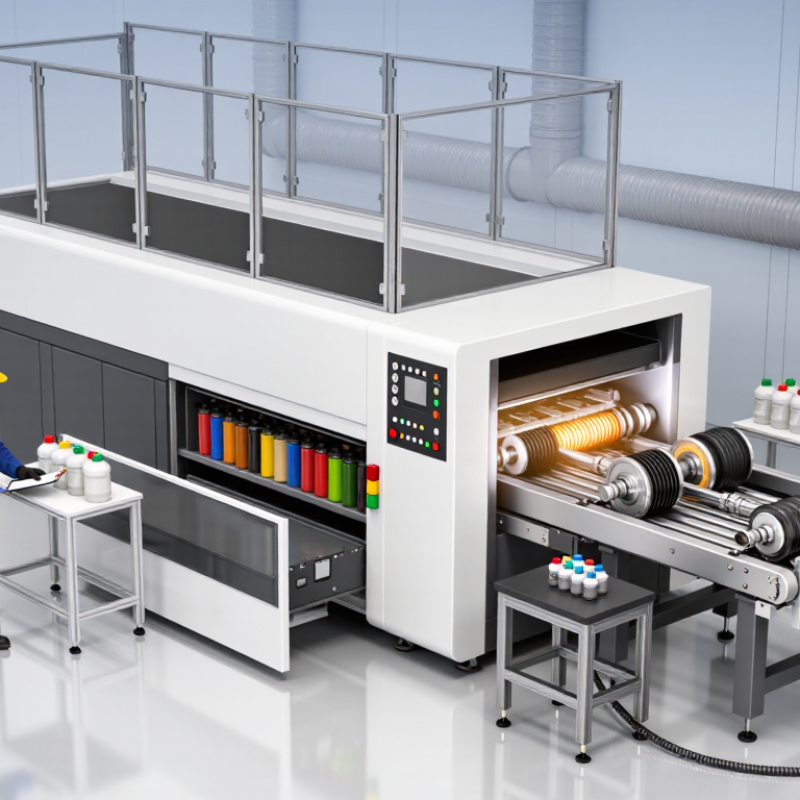
Industrial printing areas combine moving machinery, heat, electrical systems, and airborne substances. A roller nip can catch a glove or loose sleeve in seconds. Cutting blades may remain sharp after a job ends. Some curing units produce intense heat or light, while certain inks and cleaning products can irritate skin or breathing passages. The exact risks depend on the printer, materials, and room setup.
Look for hazards during normal operation and maintenance. Check that guards are fitted and emergency stops are accessible, not blocked by boxes or waste bins. Use suitable ventilation where product instructions call for it, and keep containers closed when not in use. Spills near a press create a slip risk; damp floors can also make electrical hazards harder to spot. Follow the equipment manual and workplace procedures before clearing jams or servicing machinery. Small shortcuts matter.
Tips: Keep sleeves snug and tie back long hair near moving parts. Wear task-appropriate eye and hand protection, based on the material’s safety information. Mark walkways clearly, and report damaged guards promptly. A quick pre-shift check helps, though it cannot replace proper training. We sometimes overlook familiar hazards. That is a reason to pause, not assume.
| Hazard | Typical Exposure or Injury | Risk Level | Key Safeguards and Work Practices | Routine Verification |
|---|---|---|---|---|
| Moving rollers, belts, and feed mechanisms | Pinching, entanglement, crushing, or cuts during operation, clearing jams, or cleaning. | High | Keep guards and interlocks in place; never reach into moving equipment; isolate and lock out energy before servicing or clearing hazardous jams. Tie back long hair and secure loose clothing. | Inspect guards and interlocks before use; report damage or bypassed safety devices immediately. |
| Electrical energy | Electric shock, burns, or fire from damaged cables, exposed components, or unsafe maintenance. | High | Use properly grounded equipment and suitable electrical protection; keep liquids away from electrical components. Electrical repairs should be performed by qualified personnel after the equipment is safely isolated. | Check cords, plugs, enclosures, and warning labels; remove damaged equipment from service. |
| UV curing lamps and other intense light sources | Eye or skin injury from direct or reflected ultraviolet radiation, depending on the process and exposure. | Medium to high | Keep shielding and interlocks functional; do not look directly at operating lamps. Follow equipment instructions and use task-specific protective measures where exposure assessment requires them. | Check lamp shields, enclosure panels, and interlocks before operation and after maintenance. |
| Laser marking or engraving systems | Eye or skin injury from direct or reflected laser radiation; smoke or fumes may also be generated during material processing. | High if accessible; process-dependent | Use the system enclosure and interlocks as designed; do not defeat protective features. Operate only under trained procedures and use suitable fume extraction for the materials being processed. | Confirm enclosure integrity, interlock function, and extraction operation before use. |
| Inks, solvents, cleaners, and coatings | Skin or eye irritation, allergic reactions, harmful inhalation, or fire, depending on the product and how it is used. | Medium to high; product-dependent | Review the product label and Safety Data Sheet (SDS); provide appropriate ventilation; keep containers closed and use compatible gloves and eye protection as specified by the SDS and workplace assessment. | Check labels, container condition, ventilation, and spill supplies; store incompatible materials separately as directed by the SDS. |
| Combustible materials and ignition sources | Fire or burns from flammable liquids, accumulated paper or dust, hot components, or electrical faults. | High where flammables or ignition sources are present | Follow site fire procedures; control ignition sources; store flammable products appropriately; keep exits and fire equipment accessible; clean combustible waste routinely. | Inspect housekeeping, storage, and access to fire equipment; report overheating, unusual odors, or electrical faults. |
| Noise from presses, cutters, and finishing equipment | Hearing damage from repeated or prolonged exposure to hazardous sound levels; communication may also be affected. | Depends on measured exposure | Assess noise exposure where indicated; reduce noise at the source or limit exposure where feasible. Provide and use suitable hearing protection when required by the assessment or local rules. | Investigate changes in equipment noise and maintain hearing protection and noise-control measures. |
| Manual handling and repetitive tasks | Back, shoulder, or hand strain when lifting paper rolls, moving materials, or repeating feeding and finishing tasks. | Medium; task-dependent | Use carts, hoists, or team lifts when appropriate; plan the route and keep loads manageable. Arrange workstations to reduce awkward reaches and vary repetitive tasks where practical. | Review lifting methods, workstation setup, and reports of discomfort or near misses. |
| Slips, trips, and falls | Falls caused by ink or solvent spills, loose stock, cables, or obstructed walkways. | Medium | Clean spills promptly using the workplace procedure; route cables safely; keep aisles, exits, and machine access clear; store stock in designated areas. | Check floors and walkways during routine housekeeping inspections. |
Risk levels are general screening descriptions, not exposure measurements. Actual safeguards depend on the printer type, materials, task, equipment instructions, workplace risk assessment, and applicable local regulations.
Moving rollers can catch loose sleeves or gloves, and cutting blades may stay sharp after a job. Hot surfaces, electrical systems, spills, and airborne substances add risks.
Confirm guards are fitted and emergency stops are clear of boxes and waste bins. Check walkways, cables, and floors for spills or damage. Small shortcuts matter.
Keep sleeves snug and tie back long hair near moving parts. Choose eye and hand protection for the task and material, using its safety information.
Isolate the power and verify zero voltage before opening panels. Keep cables away from hot rollers and liquid paths. Do not clear jams while machinery is energized.
Guard hot surfaces, check cooling fans, and monitor room temperature during long runs. Heat builds quietly. A warm room can affect people as well as materials.
Keep paper and oily rags away from heaters and exhaust outlets. Clear access to emergency stops and suitable fire equipment. Fine residue may hide inside enclosures.
Keep containers closed and review the safety information for each material. Use suitable ventilation and gloves, and label waste containers clearly. Store spill supplies nearby.
No. It helps, but a small leak or blocked vent can still go unnoticed. Familiar rooms make people less alert; pause and look again.
What are the safety requirements for industrial printers? They begin with identifying hazards in the printing environment, including moving parts, hot surfaces, electrical components, fumes, and materials that may pose health or fire risks. Appropriate machine guards should prevent access to dangerous areas, while clearly marked, accessible emergency-stop controls allow workers to halt equipment quickly when needed.
Safe operation also depends on managing electrical, thermal, fire, and chemical hazards through routine checks and suitable protective measures. Provide effective ventilation where printing processes generate fumes, and establish careful procedures for storing, moving, and handling printing materials. Clear operating and maintenance instructions help workers use equipment safely and recognize developing problems. Regular training should ensure that operators understand hazards, protective controls, emergency responses, and safe shutdown procedures. Together, these measures support a safer workplace and more reliable printer operation.