Imago Printer Imago Printer

How to Maintain a Digital Gold Foil Printer for Best Results?

Time:2026-05-05 Author:Henry
0%

In the growing realm of digital printing, maintaining equipment for optimal performance is crucial. Digital gold foil printers are an excellent example. They have transformed the printing industry by enabling high-quality finishes at lower costs. Understanding how to maintain a digital gold foil printer is essential for achieving these results consistently.

According to industry reports, proper maintenance can extend a printer's lifespan by up to 30%. Regular cleaning and calibration directly affect print quality. A well-maintained printer prevents costly errors and ensures vibrant, luxurious gold finishes. Neglecting maintenance can lead to inefficiencies, wasted materials, and diminished print quality. Every printer operator should consider the tangible benefits of a comprehensive maintenance plan.

Moreover, while many users overlook routine checks, these practices play a significant role in reliability. Developing a clear understanding of the printer's needs enhances productivity. Monitoring wear and tear on crucial components is vital. Ultimately, knowing how to maintain a digital gold foil printer leads to superior results while minimizing downtime and expenses.
How to Maintain a Digital Gold Foil Printer for Best Results?

Understanding the Components of a Digital Gold Foil Printer

Understanding the components of a digital gold foil printer is essential for optimal maintenance and results. At its core, the printer consists of several key parts. The heating unit plays a critical role in the process. It melts the gold foil, allowing it to adhere to the substrate. Regular checks on the heating element and ensuring it is free from dust will help maintain consistent performance.

Another crucial component is the pressure mechanism. This ensures an even transfer of the foil onto the material. Misalignment can lead to poor results. It's important to inspect this mechanism frequently. Any wear or miscalibration should be addressed promptly to avoid costly mistakes.

Additionally, the imaging system must be kept clean. Ink residue can cause print quality issues. A simple wipe-down after each printing session can make a difference. However, users may overlook this step, risking consistent quality. Lastly, software updates are often neglected. Keeping the printer's software current ensures compatibility and efficiency. Regularly revisiting these components can lead to better prints and less downtime.

Digital Gold Foil Printer Maintenance Statistics

Essential Maintenance Tools for Digital Gold Foil Printers

Regular maintenance of a digital gold foil printer is crucial for optimal performance. Having the right tools on hand can make this task easier and more effective. Key tools include a cleaning kit, calibration tools, and spare parts. A comprehensive cleaning kit ensures that dust and debris do not affect the quality of the prints. Cleaning the printer’s components regularly can extend its lifespan.

When conducting maintenance, it’s essential to use proper calibration tools. These tools help align the printer and ensure accurate transfers. Improper calibration can lead to misalignment issues, causing poor print quality. For those new to digital printers, finding reliable calibration resources can be challenging. Yet, it's an important aspect that shouldn't be overlooked.

Tip: Schedule regular maintenance checks. These checks can identify potential issues early. Neglecting maintenance can lead to costly repairs and downtime. Keeping an eye on wear and tear can prevent unexpected breakdowns, ensuring consistent results. Modern printers can behave unpredictably, and staying proactive will help maintain quality. Investing time in routine checks saves more time later.

Step-by-Step Cleaning Procedures for Optimal Performance

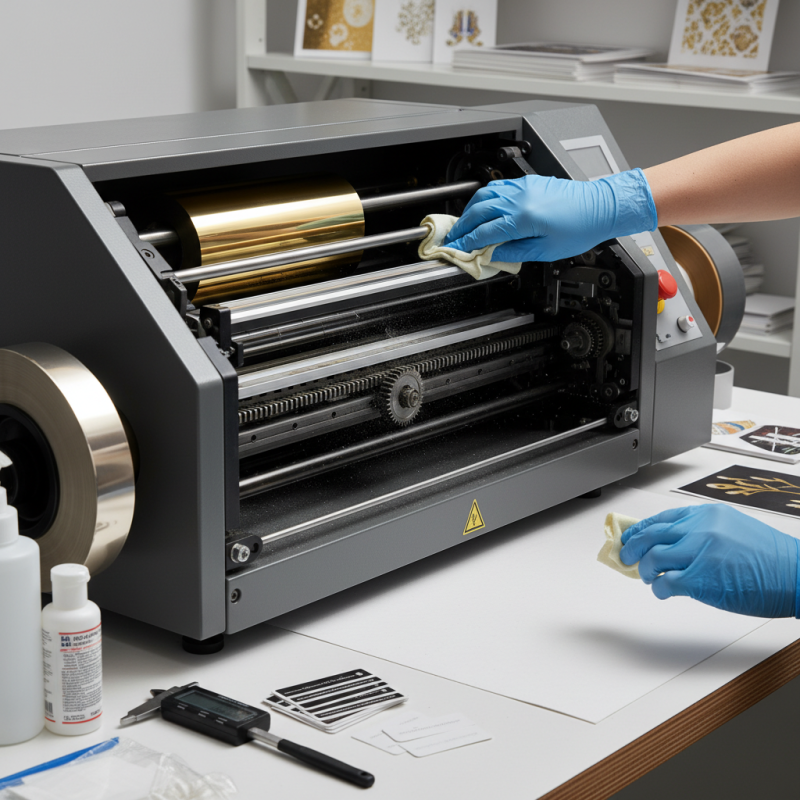
To keep your digital gold foil printer in top shape, regular cleaning is essential. Start with a careful inspection of the printer's exterior. Dust accumulation can affect performance. Use a soft cloth to wipe the surfaces. Pay special attention to the areas around the control panel and input trays. These spots often attract debris.

Next, move to internal components. Open the printer and gently remove any scraps of foil or paper. A handheld vacuum can help reach tight spaces. Remember to check the rollers and plates. A buildup here can lead to uneven prints. Use a lint-free cloth with a mild cleaner for sticky areas.

Finally, clean the printheads and nozzles. Dried foil can clog these parts. Follow specific cleaning procedures to ensure they are clear. It’s a good idea to perform this maintenance weekly, especially during heavy use. Regular checks will lead to better quality and prevent long-term damage. Don’t hesitate to retrace steps if something doesn’t feel right. Regular adjustments can make a significant difference.

Adjusting Settings for Enhanced Print Quality

To achieve enhanced print quality, adjusting the settings on a digital gold foil printer is crucial. Each project requires specific adjustments to ensure the right finish. Experimenting with pressure, temperature, and speed settings can yield significantly different results. Sometimes, it can feel daunting to find the perfect configuration. However, refining these settings is often a trial-and-error process.

Tips: Always clean the print head before making adjustments. A clean head improves ink flow and print precision. Document each change you make. This practice helps identify what works best and what does not. Don't hesitate to revisit your settings if you encounter issues.

Another important aspect of maintaining quality is the type of material used. Different substrates interact uniquely with gold foil. Some may absorb heat better than others. The thickness of the media also influences results. If you find the foil does not adhere well, consider switching materials. Always review the settings based on the type of project, as previous configurations may not always apply.

Tips: If results fluctuate, lower the temperature slightly. High temperatures can cause over-foiling. Ensure consistent humidity levels, as this can affect adhesion. Testing on scrap materials is advisable to avoid costly mistakes. Regularly revisiting your settings is essential to adapting to new media and projects.

Regular Checks and Troubleshooting for Longevity

Maintaining a digital gold foil printer requires regular checks to ensure optimal performance. Checking the printer's software and hardware periodically is crucial. Look out for any error messages that may arise during operation. These often indicate deeper issues that need attention. Ignoring such messages can lead to a decline in print quality. Simple tasks, like cleaning the printer head or checking ink levels, can significantly impact output.

Troubleshooting common issues is essential for longevity. If prints come out smudged or inconsistent, this could indicate a problem with the foil feed or alignment. Adjusting these settings can often resolve the issue. Pay attention to the temperature settings, as they can affect foil adhesion. Too high or too low temperatures can lead to subpar results, causing frustration and waste.

Regularly reviewing maintenance logs can provide insights into recurring problems. This reflection can help prioritize which areas need more attention. Maintaining a consistent schedule for these checks can lead to improved efficiency. It’s easy to overlook minor issues until they escalate. Visual inspections, along with these routine checks, can keep your digital gold foil printer running smoothly.

FAQS

: What are the key components of a digital gold foil printer?

: The main components include the heating unit, pressure mechanism, imaging system, and necessary software.

How does the heating unit affect printing?

It melts the gold foil to adhere properly to the material, making maintenance vital for consistent performance.

Why is the pressure mechanism important?

It ensures the foil transfers evenly, and misalignment can lead to poor print results.

What should I do to maintain the imaging system?

Regularly clean it to prevent ink residue buildup, impacting print quality. A quick wipe-down can help.

How can adjusting settings improve print quality?

Experiment with pressure, temperature, and speed to find the best configuration for each project.

What happens if temperature is too high?

Over-foiling may occur, which can damage the print. Lowering temperature helps with adherence.

How does substrate thickness affect printing?

Different materials absorb heat differently, affecting how well the foil adheres. Test for best results.

Why should I document my settings changes?

Keeping records helps identify effective settings and improves troubleshooting for future projects.

How often should I check for software updates?

Regular updates are essential for maintaining efficiency and compatibility, so revisit this frequently.

What should I test to avoid costly mistakes?

Always try setting adjustments on scrap materials first to ensure desired outcomes before final prints.

Conclusion

To successfully understand how to maintain a digital gold foil printer, it is essential to familiarize oneself with its intricate components, as they play a crucial role in achieving optimal performance. Essential maintenance involves having the right tools and implementing a systematic cleaning procedure to ensure the printer operates at its peak.

Additionally, adjusting the printer settings can significantly enhance print quality, providing sharper and more vibrant results. Regular checks and troubleshooting practices will prolong the life of the printer, helping to identify and resolve any issues before they escalate. By following these steps, users can ensure their digital gold foil printer delivers the best results consistently.

Henry

Henry

Henry is a dedicated marketing professional with a profound expertise in the company's offerings. With years of experience in the industry, he possesses an impressive understanding of the market dynamics and consumer behaviors that drive success. Henry is committed to sharing his insights through......