Imago Printer
At a crowded event, a printed item can turn a passing visitor into a participant. A personalized tote, poster, badge, or phone case gives people a reason to stop. It also creates a physical reminder after the venue closes. That matters as brands compete for limited attention and meaningful interaction.
Industry data supports this shift. Grand View Research identifies personalization, ecommerce integration, and digital production as major drivers of the global print-on-demand market. Its market analysis also forecasts strong double-digit growth through 2030. Freeman’s 2024 Trends Report, The Future of Live Events, emphasizes that audiences increasingly value experiences that feel relevant, participatory, and shareable. UFI’s Global Exhibition Barometer similarly tracks resilient demand for face-to-face exhibitions across international markets. These findings do not guarantee success. Execution still matters.
A well-planned station needs more than a printer and attractive samples. It needs a clear design screen, reliable internet, calibrated equipment, spare blanks, visible pricing, and a staff member who can solve errors calmly. A visitor should understand the process within seconds. Choose a simple workflow: select, personalize, approve, print, collect. Small details matter. Keep the pickup shelf dry and labeled. Test colors under the venue’s lighting. Obtain clear consent before using customer images or contact details.
This guide explains How to set up a print-on-demand station for events, from equipment selection to queue design and post-event measurement. A useful warning remains: many teams count printed products, but overlook waiting time, repeat visits, waste, and qualified engagement. The station may look busy. It may still underperform. Performance should be reviewed honestly.
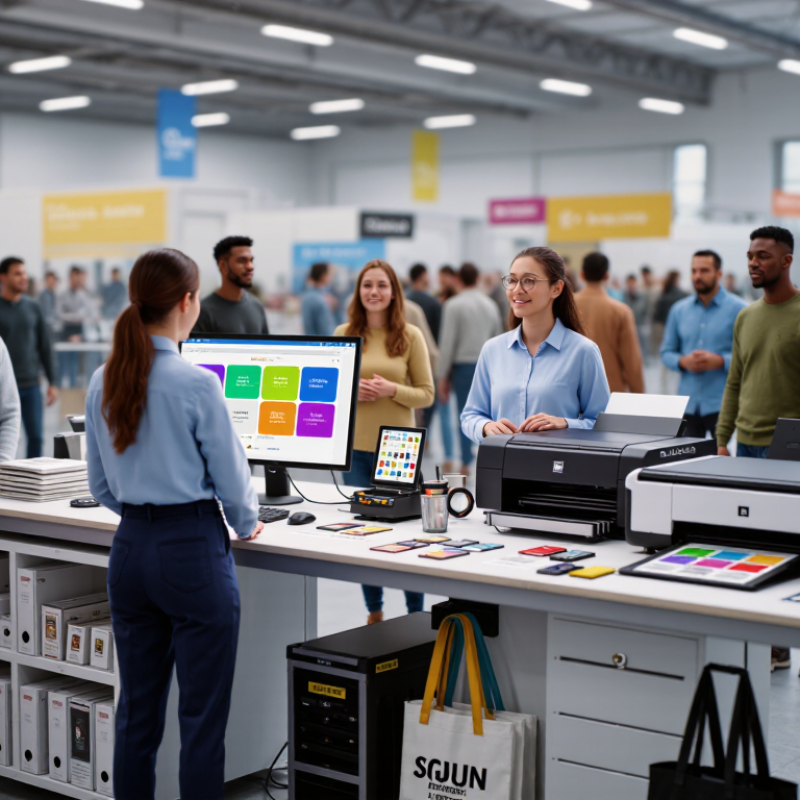
An event-based print on demand station is a small production area where visitors create and receive personalized printed items onsite. They might select a prepared design, add a name, or upload an approved image. A trained operator checks the file before production. The system then sends the artwork to a suitable printer. The item may be a card, label, poster, fabric piece, or event keepsake. Guests see the process happen in real time. That physical moment often creates more engagement than a standard giveaway.
In practice, a dependable station needs clear instructions, stable power, ventilation, and enough working space. I would place the design screen away from the pickup counter. This reduces crowding. A visible preview helps guests check spelling, colors, and image placement before printing. Staff should explain how personal data is handled and obtain permission when images include identifiable people. A test print can reveal unexpected color shifts or blurry details. Small errors matter. They affect trust.
The workflow also needs a realistic queue plan. Some designs take longer than others. A spare supply of approved materials prevents avoidable interruptions. Not every setup works perfectly. Humidity, weak internet access, or rushed artwork can slow production. That is normal, but it should be recorded and reviewed after the event. At a conference, the station may personalize attendee materials. At a community gathering, it may turn local artwork into physical souvenirs. The best results come from simple choices, careful checking, and an operator who can respond calmly when the printer behaves unpredictably.
At a busy event, visitors often move quickly from one display to another. On-site printing gives them a reason to pause. A guest can upload a photograph, choose a layout, and receive a physical keepsake within minutes. The printed item creates a stronger memory than a passing screen image. It also gives staff a natural opening for conversation. “Which photo feels most like today?” sounds more personal than a generic sales question. In practice, this small interaction can make the event feel warmer.
A well-planned station should be visible, simple, and easy to access. Place it near a waiting area, but not where queues block traffic. Use clear instructions, sample prints, and one trained operator for quality checks. Paper, ink, and backup equipment need daily inspection. Small delays quickly affect mood. A good workflow includes image approval, color testing, and careful handling of personal photos. Visitors should understand how their files are used and when they are removed. This supports trust and responsible event management.
Printing can extend engagement after the event. Guests may display the print at home or share it with friends. Yet the station is not automatically successful. Some guests may dislike waiting, and poor lighting can ruin a good image. I would measure queue time, completed prints, and visitor feedback before repeating the setup. The results might challenge the original plan. That is useful. A memorable print depends on thoughtful service, not technology alone.
Why Set Up a Print on Demand Station at Events?
A print on demand station turns a passive booth visit into a small, useful experience. Attendees can personalize tote bags, badges, postcards, or event posters within minutes. They choose the design. They watch it being produced. That physical moment makes the event easier to remember. The PPAI 2023 Consumer Study reported that 88% of consumers recalled the advertiser on a promotional product they received. Personalization can make that recall feel more relevant, not merely louder.
For brands, the station creates measurable interactions. Staff can connect each order with consent-based registration, preferred designs, or session interests. Organizers gain a visual attraction and another reason to explore quieter areas. Attendees leave with something practical, such as a labeled notebook or locally themed print. UFI’s 2024 Global Exhibition Barometer found that 57% of companies expected exhibition activity to increase during 2024. More activity means more competition for attention. A printer, paper stack, and visible queue can help, but they can also create clutter. It is not magic.
Tips: Use two or three templates, not twenty. Offer fast paper options and clear collection times. Place the station near, but not inside, the main entrance. Test the artwork, color settings, and network connection before guests arrive. Ask for minimal personal data. Track completed prints, waiting time, and repeat visits. The weak point is often staffing. One friendly operator can prevent a five-minute delay from becoming a poor memory.
| Stakeholder | Measured Dimension | Planning Input | Calculated Data | Key Benefit |
|---|---|---|---|---|
| Brands | Personalized content delivered | 150 attendees × 40% participation × 1 print | 60 personalized prints | Creates a tangible takeaway that can carry event messaging beyond the venue. |
| Brands | Interactive engagement opportunity | One user action required before printing | 60 qualified interactions | Links the physical print to a participation action such as uploading, selecting, or customizing content. |
| Organizers | Estimated active printing time | 60 prints × 20 seconds per print | 1,200 seconds / 20 minutes | Provides a simple workload estimate for staffing, queue planning, and equipment selection. |
| Organizers | Average print throughput | 60 prints distributed across a 3-hour activation | 20 prints per hour on average | Helps organizers evaluate queue capacity and identify peak-period staffing needs. |
| Organizers | Paper consumption | 60 A4 sheets at 80 g/m²; one A4 sheet weighs approximately 5 g | Approximately 300 g of paper | Supports practical stock planning and reduces unnecessary transport and storage. |
| Organizers | Format flexibility | A4: 210 × 297 mm; A3: 297 × 420 mm | Two standard print-size options | Allows the station to support compact handouts as well as larger posters or display pieces. |
| Attendees | Personalization level | One participant-selected image, message, or template per print | 1 personalized output per completed interaction | Makes the event experience more relevant than receiving a standard, pre-printed handout. |
| Attendees | Immediate fulfillment | Print produced at the point of participation | Same-session physical delivery | Improves convenience because attendees do not need to wait for post-event delivery. |
| All stakeholders | Digital and physical content connection | Optional QR code or short URL printed on each output | One measurable follow-up pathway | Connects the physical keepsake with digital information, registration, feedback, or post-event content. |
A print on demand station turns event interest into a physical keepsake. The setup needs more than a printer and blank products. Prepare a reliable printer, compatible ink, transfer paper, a heat press, cutting tools, extension cables, and a stable worktable. Keep spare paper, ink, protective sheets, and cleaning cloths nearby. Small gaps in preparation can create long queues.
The workflow should be simple enough for a first-time visitor. A staff member checks the submitted design for size, resolution, spelling, and approved content. The customer confirms the preview before production begins. The file then moves to a dedicated computer, where the operator adjusts color and print settings. After printing, allow the ink to dry briefly. Place the design carefully on the product, secure it with heat-resistant tape, and apply measured heat and pressure. Follow the material supplier’s safety instructions, especially around hot surfaces.
A visible sample helps customers choose quickly. Clear signs should show product sizes, prices, and expected waiting times. Use numbered orders or a simple queue board to prevent confusion. I have found that one person managing files and another handling pressing keeps the station moving. However, busy events can expose weak planning. Test the full process before opening, record average production time, and leave space for mistakes. Some prints will need redoing. That is normal, but unchecked errors waste stock and disappoint visitors.
Estimated average time required for each stage of an on-site event printing workflow.
A compact print on demand station can shorten the path from customer order to finished item. Preparing artwork and loading the product take the most time, while heat pressing and quality checking can usually be completed quickly when equipment and materials are organized in advance.
A strong print-on-demand station begins with a practical event plan. Define the audience, print format, artwork limits, and expected visitor volume. My first layout failed because the queue blocked a busy aisle. Keep it visible. Allow space for mobility access, staff movement, and safe equipment handling. Test the complete process before opening, from file submission to final pickup. A short trial often reveals confusing instructions or slow finishing steps.
Operating the station requires clear roles and simple decisions. One person can check artwork and permissions, while another manages printing and collection. Display usage rules in plain language. Collect only necessary personal information, and explain how it will be handled. Staff should monitor paper, ink, power, and waste throughout the event. Measure the friction. If visitors repeatedly ask the same question, the signage needs improvement. If the queue grows, pause new orders briefly instead of rushing production.
A useful scorecard connects activity with quality. Record total orders, completed prints, average waiting time, reprints, material waste, and abandoned requests. Ask visitors one quick question about the experience. A small response sample is still useful, but it can mislead if only enthusiastic guests answer. Compare results across event sizes and station layouts. Review failures honestly. A high order count may hide long waits or excessive waste. The best station is not merely busy; it is controlled, accessible, and consistently reliable.
It gives visitors a reason to pause, choose an image, and receive a physical keepsake within minutes. The print can feel more memorable than a screen image.
Place it near a waiting area, but away from busy aisles. Keep the station visible and accessible. Do not block mobility paths or staff movement.
Provide clear instructions, sample prints, layout choices, and simple usage rules. A visible sample helps visitors understand the final result quickly.
Staff can ask personal, open questions about the visitor’s chosen image. For example, “Which photo feels most like today?” sounds less generic.
Inspect paper, ink, power, and backup equipment each day. Test image approval, color quality, and finishing before visitors arrive. Small delays affect mood.
Explain how uploaded files are used and when they are removed. Collect only necessary information. Clear communication supports visitor trust.
Test the complete process before opening. If the queue grows, pause new orders briefly instead of rushing production. Rushing can create poor prints.
Record orders, completed prints, waiting time, reprints, material waste, and abandoned requests. Ask one short feedback question. Busy does not always mean successful.
Yes. Poor lighting, confusing instructions, or a blocked aisle can damage the experience. My first layout failed this way. The plan may be wrong.
Compare results across layouts and event sizes. Review failures honestly, including waste and long waits. A small response sample can still mislead.
An event-based print-on-demand station is a dedicated area where attendees can create and receive personalized printed items during an event. By combining simple design tools, reliable printing equipment, and an efficient fulfillment process, the station turns participation into a memorable experience. Visitors can customize images, messages, or event-themed designs and take home a physical keepsake, encouraging interaction and extending the event’s impact beyond the venue. Understanding how to set up a print-on-demand station for events begins with selecting suitable printers, paper or garment materials, design software, display equipment, and staff roles.
A successful station should be planned around audience flow, printing speed, space, power, and clear instructions. Organizers can measure performance through participation rates, production volume, waiting times, attendee feedback, and social engagement. For brands and event teams, on-site printing can increase visibility, strengthen emotional connections, and create useful data for future planning. With thoughtful preparation, smooth operation, and consistent quality control, the station can benefit attendees, organizers, and sponsors alike.
